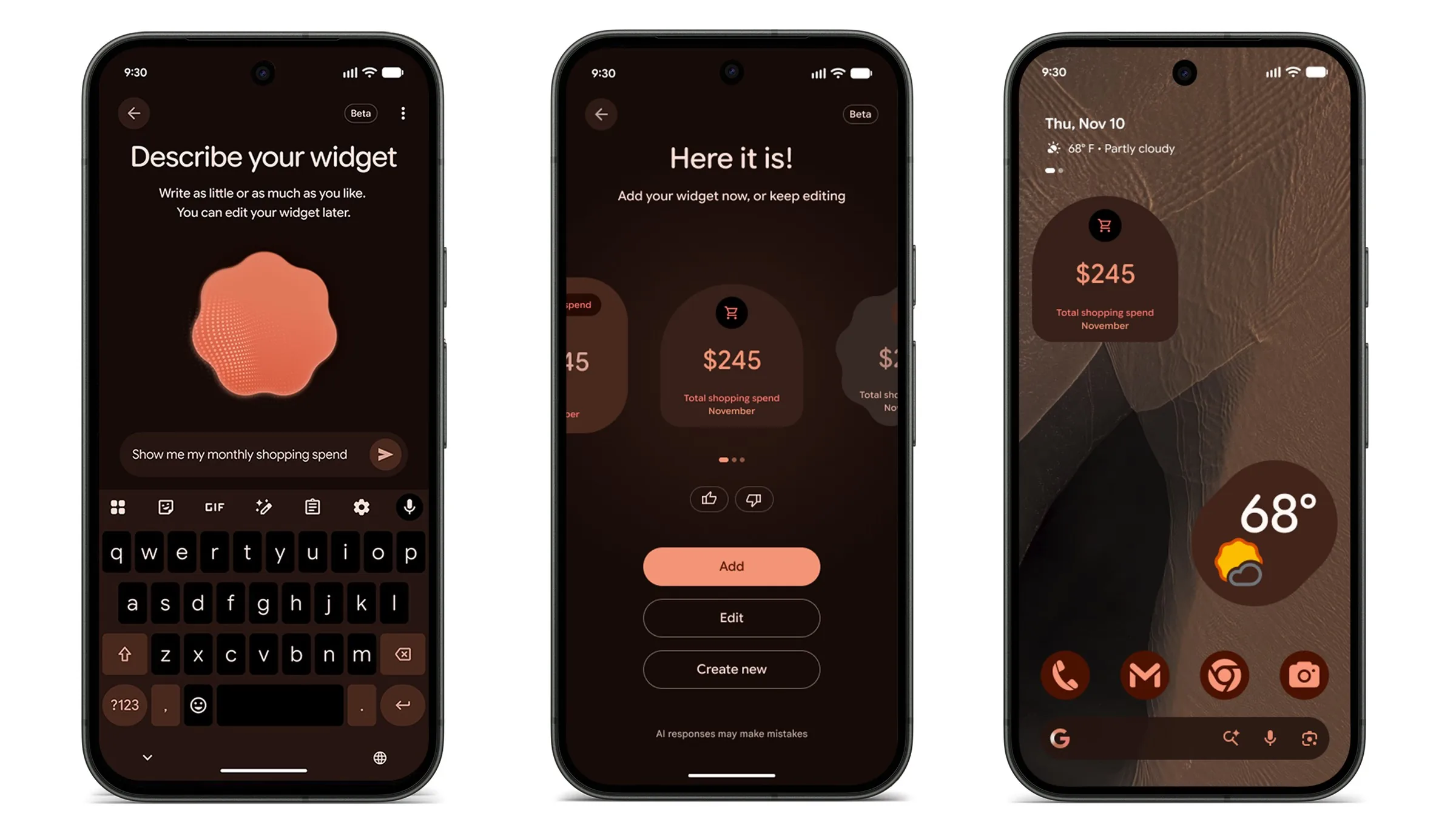
Google’s November Pixel Drop brings a new feature called Create My Widget to Pixel phones. With it, you can just describe the home screen widget you want in your own words, and Gemini will build it for you — no coding necessary.
Gemini can pull in info from Gmail, Calendar, and Search. Some of the examples showcased by Google so far include a monthly spending tracker as well as a game day widget in your team’s colors. They also made a trip countdown that pulls in your flight and reservation details all by itself. So you’re no longer stuck with whatever widget an app maker decided to build — or not build.
How to make your own widget
To make your own widget, just long-press an empty spot on the home screen, tap Widgets, then Create. You can type what you want or start from a template, like Important dates, Sports & fitness, or Finance. If the preview isn’t right, tap Edit and describe the change.
It works on Pixel 10 and Pixel 11 phones, except the Pixel 10a, and is rolling out over the next few weeks. Google’s help page says it’s in English, in Australia, Canada, India, the US, and the UK, for users 18 and up. Heavier use may need a subscription.
Google first announced the feature in May, and it reached the Googlebook before phones. In a post on its official blog, Google said the Pixel Watch 4 and Pixel Watch 5 get it next.
Gemini Intelligence comes to the Pixel 10
Supported phones also get Gemini Intelligence. That’s the set of Android AI features previously rolled out for the Pixel 11, Samsung Galaxy S26, Z Fold8, and Z Flip8. It includes Rambler, voice typing in Gboard that drops filler words like “um” and turns what you say into clean text as you talk. Gemini’s multi-step tasks, like ordering groceries or booking a ride, are also expanding to the UK, India, and Japan.
Pixel phones with Gemini Intelligence will also get more from Gemini in the car. In a separate post, Google said Gemini will soon bring proactive suggestions to Android Auto, using your apps to help when you need it. In Google’s example, a friend texts to ask where your pilates class meets. Gemini finds the confirmation email and offers to send the address in one tap.
HiLight now glows for texts from your favorites
HiLight is a light on the Pixel 11 Pro, Pro XL, and Pro Fold that glows to give you a heads-up. It used to light up only while Gemini was working on an answer or when a favorite contact called. Now it works with texts in Google Messages, too.
Pick a color for each favorite contact, then turn on Messages from favorites in HiLight’s settings. When your phone is face down and one of them texts you, it glows in their color, so you know who it is.
The November Pixel Drop is rolling out now and will keep reaching phones over the next several weeks. If you have a Pixel 10 or Pixel 11, other than the 10a, watch for Create in your Widgets menu.